
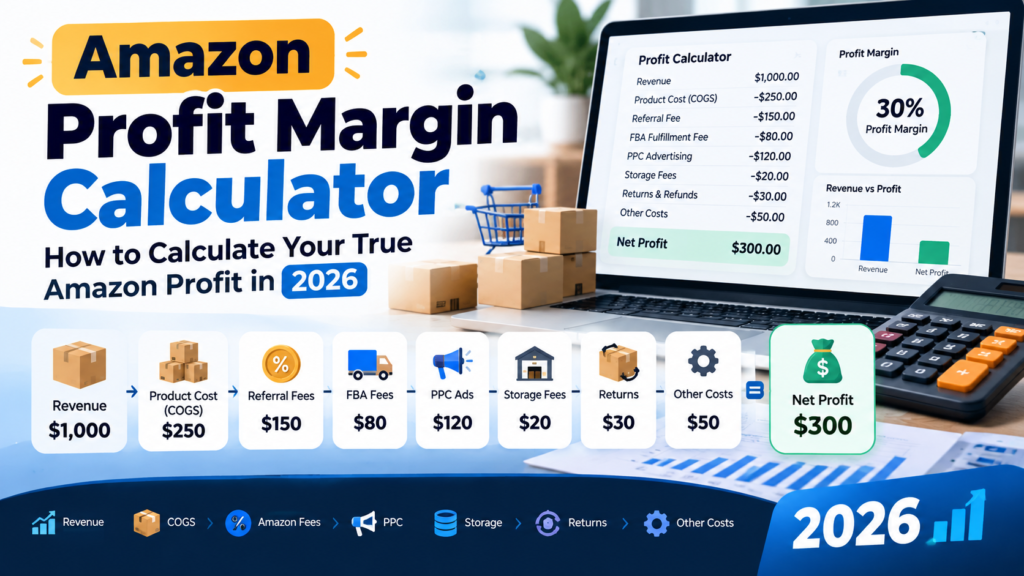
A seller doing $100,000 a month in Amazon revenue and a seller doing $30,000 a month can have the exact same amount of money left over at the end of the day or the bigger number can actually be losing money. Revenue tells you how much came in. It says nothing about how much you actually keep.
That gap is where most Amazon sellers get their financial picture wrong. Product cost, Amazon’s referral and fulfillment fees, PPC spend, storage, returns, and a long list of smaller charges all come out before a sale turns into profit. Skip even one of these in your math, and the number you’re using to make pricing, inventory, and growth decisions is fiction.
This guide walks through exactly how to calculate your Amazon profit margin not just the formula, but every cost category that has to go into it, with realistic examples you can apply to your own products.
What Is Amazon Profit Margin?
Profit margin measures how much of your revenue you actually keep after costs, expressed as a percentage. To calculate it correctly, you need to understand a few terms that often get used loosely or interchangeably, when they shouldn’t be.
Revenue is the total amount of money a sale brings in selling price × units sold, before anything is subtracted.
Cost of goods sold (COGS) is what it costs to produce or acquire the product itself, including manufacturing and getting it into sellable condition.
Gross profit is revenue minus COGS. It tells you what’s left before Amazon’s fees, advertising, and other operating costs come out.
Operating expenses cover everything else required to run the sale: Amazon’s referral and fulfillment fees, PPC spend, storage costs, returns processing, and any other selling-related costs.
Net profit is what’s left after subtracting both COGS and all operating expenses from revenue. This is your actual bottom line.
Profit margin is net profit divided by revenue, shown as a percentage: (Net Profit ÷ Revenue) × 100.
A simple example:
A product sells for $30. COGS is $8, leaving $22 in gross profit. Amazon fees, FBA fulfillment, and PPC spend together total $16. Net profit is $22 − $16 = $6. Profit margin is $6 ÷ $30 = 20%.
That 20% only means something if every real cost was actually included which is exactly where most sellers’ calculations fall short.
Amazon Revenue vs. Amazon Profit
Two products can generate identical revenue and land in completely different financial positions. A product doing $100,000 in monthly sales might net $25,000 in profit or it might net $2,000, or lose money, depending on what sits underneath that top-line number.
The variables that create this gap include:
- COGS a higher-cost product eats more of every sale before anything else is subtracted
- Amazon referral and fulfillment fees these vary by category, size, and weight, and can differ significantly between two products that sell at the same price
- PPC spend a product that needs heavy advertising to generate sales has a very different cost structure than one ranking well organically
- FBA costs fulfillment and storage fees scale with product size and how long inventory sits before selling
- Returns a product with a high return rate loses both the sale and the cost of getting that unit back into (or out of) inventory
- Discounts and promotions coupons, deals, and promotional pricing reduce effective revenue per unit
- Other operating expenses packaging, prep services, subscription plan fees, and category-specific charges
Revenue answers “how much did we sell.” Profit answers “was it worth it.” Sellers who only track the first number are, in a very literal sense, flying without instruments.
How to Calculate Amazon Profit Margin
Here are the core formulas, with each component defined.
Gross Profit = Revenue − COGS
Net Profit = Revenue − COGS − Operating Expenses (Operating expenses = Amazon fees + FBA fees + PPC + storage + returns + other costs)
Profit Margin (%) = (Net Profit ÷ Revenue) × 100
Contribution Margin = Revenue − Variable Costs Contribution margin is a related but distinct metric it isolates costs that scale directly with each unit sold (COGS, referral fees, fulfillment fees, PPC allocated per unit) from fixed costs that don’t change with volume. It’s especially useful when deciding whether a specific SKU is worth continuing to sell or scale, because it shows what each additional unit actually contributes before fixed overhead is considered.
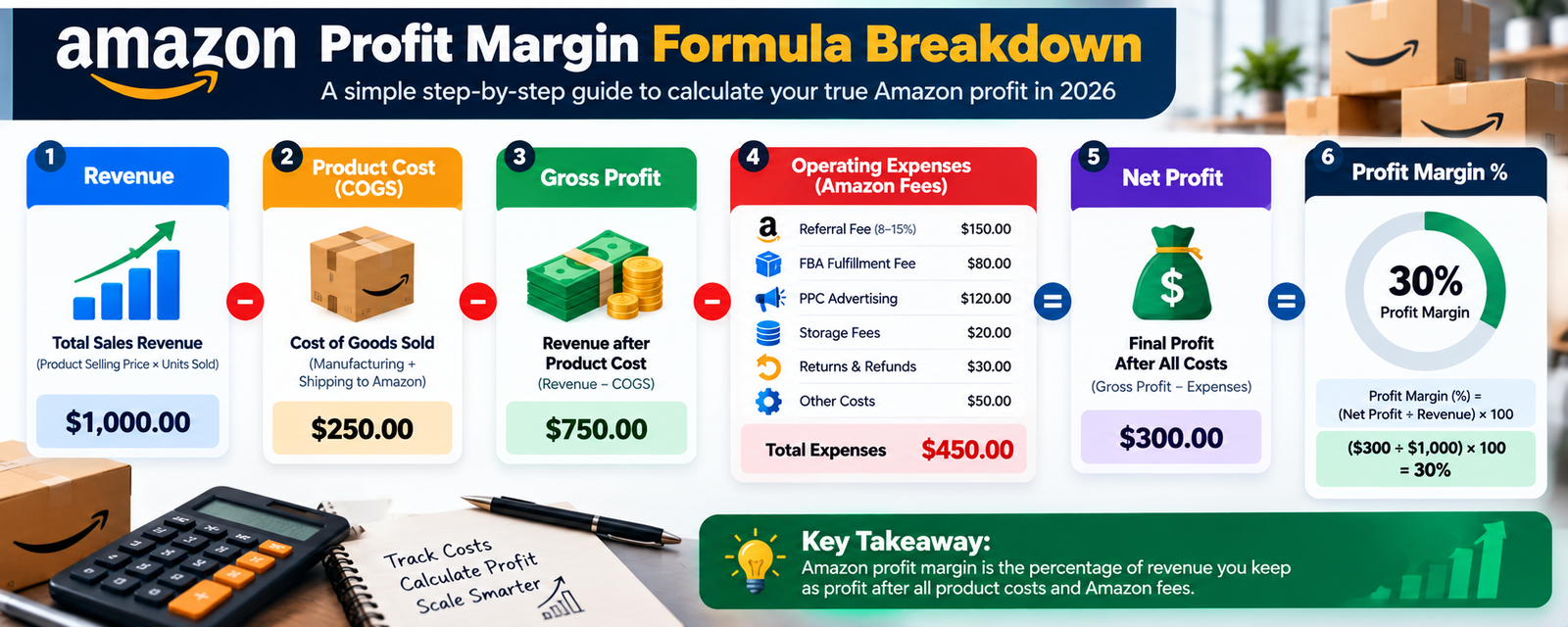
Worked example:
A seller sells a kitchen product for $35. COGS is $9. Amazon’s referral fee is 15% ($5.25). FBA fulfillment fee is $6.20. PPC spend allocated to this unit is $3.50. Storage cost allocated per unit is $0.60. Returns allowance (based on historical return rate) is $0.90 per unit.
- Gross profit: $35 − $9 = $26
- Total operating expenses: $5.25 + $6.20 + $3.50 + $0.60 + $0.90 = $16.45
- Net profit: $35 − $9 − $16.45 = $9.55
- Profit margin: $9.55 ÷ $35 = 27.3%
This is the level of detail that separates an accurate profit picture from a rough guess.
Amazon Profit Margin Calculator
You don’t need custom software to run this a simple spreadsheet with the right line items does the job. Here’s the input structure to build one for any product:
| Input | Example Value |
|---|---|
| Selling price | $35.00 |
| Units sold (monthly) | 500 |
| Product cost (landed, per unit) | $9.00 |
| Referral fee (%) | 15% |
| FBA fulfillment fee (per unit) | $6.20 |
| PPC spend (monthly total) | $1,750 |
| Storage fee (monthly, allocated) | $300 |
| Returns/refunds (allocated) | $450 |
| Other costs (prep, subscription share, etc.) | $200 |
Running the numbers at scale:
- Revenue: 500 × $35 = $17,500
- COGS: 500 × $9 = $4,500
- Referral fees: 15% × $17,500 = $2,625
- FBA fulfillment: 500 × $6.20 = $3,100
- PPC: $1,750
- Storage: $300
- Returns: $450
- Other: $200
- Total costs: $4,500 + $2,625 + $3,100 + $1,750 + $300 + $450 + $200 = $12,925
- Net profit: $17,500 − $12,925 = $4,575
- Profit margin: $4,575 ÷ $17,500 = 26.1%
Notice how each input moves the final number. If PPC spend doubled to $3,500 with no increase in units sold, profit margin would drop to roughly 15.7% the same revenue, a meaningfully different business. Amazon’s own Revenue Calculator in Seller Central can help estimate referral and fulfillment fees for a specific ASIN, which is a useful starting point before layering in your own PPC, storage, and returns data.
Amazon FBA Fees You Need to Include
FBA costs aren’t one line item they’re several, and missing any of them understates your true cost per unit.
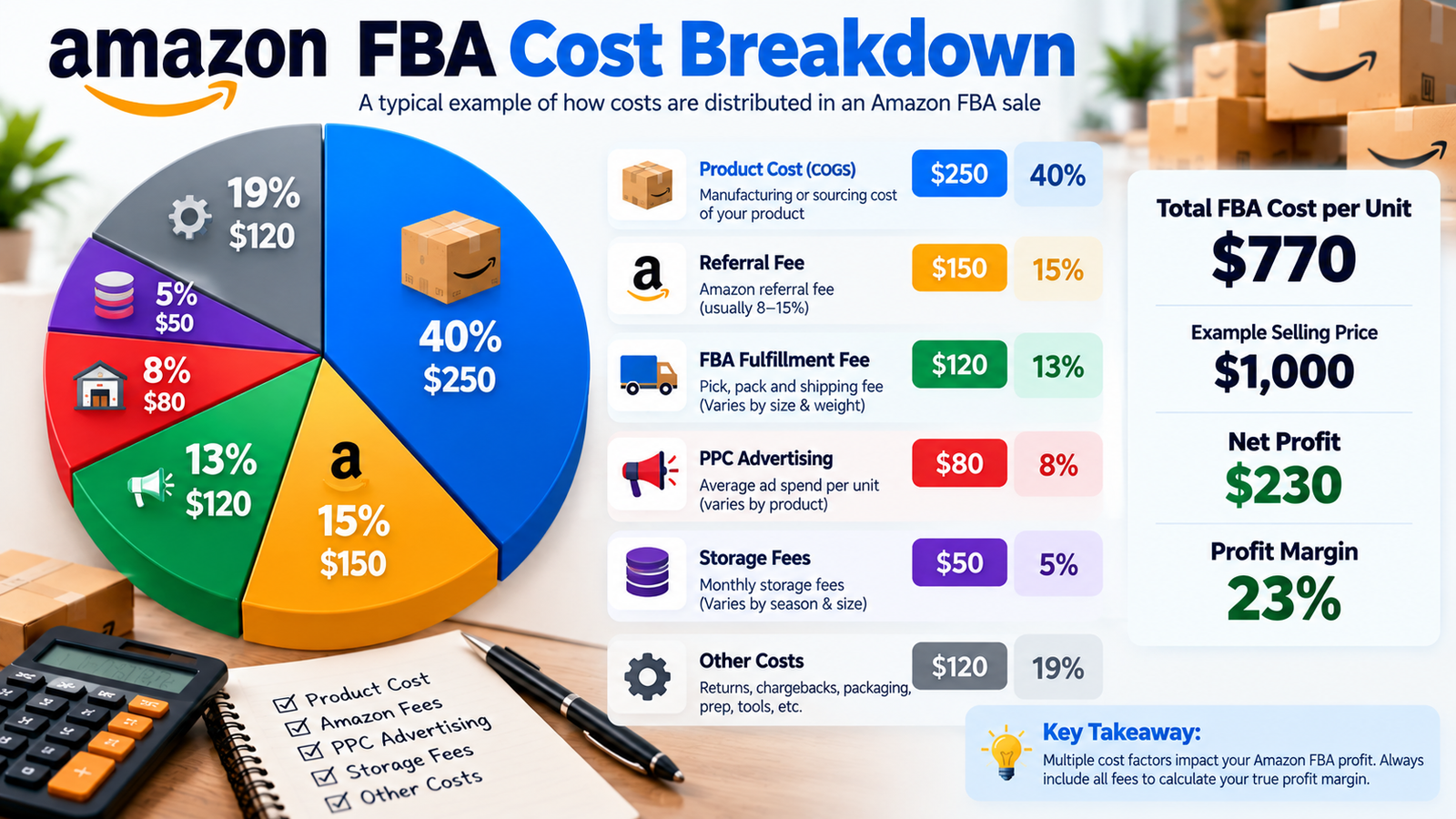
- Referral fees Amazon’s commission on each sale, which varies by category. Most categories fall in a similar general range, though some (like consumer electronics) are lower and others (like certain accessory categories) run notably higher.
- FBA fulfillment fees charged per unit based on size and weight tier, covering picking, packing, and shipping.
- Monthly storage fees charged per cubic foot of space your inventory occupies in Amazon’s fulfillment centers, and these rates are typically higher during the October–December peak period.
- Aged inventory and long-term storage-related costs additional charges that can apply to inventory that sits unsold beyond a certain threshold, which is a strong incentive to keep inventory turning rather than over-ordering.
- Inbound and shipping-related costs getting inventory from your supplier into Amazon’s network, including any placement or inbound fees.
- Returns-related costs processing fees and lost sellable value when units come back damaged or unsellable.
- Other applicable fees subscription plan costs, and category- or program-specific charges that may apply to your account.
Because fee amounts change over time and vary by product specifics, don’t rely on last year’s numbers or a generic blog figure for exact rates. Amazon publishes its current referral fee schedule and FBA fee tables directly in Seller Central, and reviewing them for your specific category and product dimensions is the only way to get numbers you can actually trust for planning.
How Amazon PPC Affects Profit Margin
Advertising spend is a real, direct cost not a marketing abstraction separate from your P&L. Understanding a few key metrics helps connect ad performance to actual profitability:
- ACOS (Advertising Cost of Sale) ad spend divided by ad-attributed revenue, shown as a percentage. A lower ACOS generally means more efficient advertising, but it’s only half the picture.
- ROAS (Return on Ad Spend) the inverse view: revenue generated per dollar of ad spend.
- TACOS (Total Advertising Cost of Sale) ad spend as a percentage of total revenue (organic plus paid), which shows how much your entire business depends on advertising to generate sales.
Here’s the trap many sellers fall into: a campaign can show a “good” ACOS on paper while still eroding overall profitability, if the product’s margin is thin to begin with. A 25% ACOS on a product with a 40% gross margin still leaves room for profit. The same 25% ACOS on a product with a 20% gross margin can push that product into a loss once every other cost is included.
Example: A product sells for $25 with a 35% gross margin ($8.75 gross profit per unit). If PPC costs $6.25 per unit sold (a 25% ACOS), that alone consumes most of the gross profit before FBA fulfillment, storage, and returns are even subtracted. The campaign “performs well” by ACOS standards, but the product may be barely breaking even or losing money once the full cost stack is applied.
This is why PPC should always be evaluated against contribution margin and net profit, not judged in isolation against sales volume alone.
Product Cost and Landed Cost
Many sellers calculate profitability using only their manufacturing price what they pay a supplier per unit. That number is almost never the real cost of getting inventory ready to sell.
Landed cost includes:
- Manufacturing the base unit cost from your supplier
- Packaging retail packaging, inserts, and any branded materials
- Freight international and domestic shipping to get inventory to a warehouse or directly to Amazon
- Duties and tariffs import costs that apply depending on product category and country of origin
- Prep services labeling, poly-bagging, or other prep required before inventory is FBA-ready
- Inbound shipping the cost of moving inventory from your prep location (or directly from your supplier) into Amazon’s fulfillment network
- Other costs required to make inventory sellable anything else that has to happen before a unit is available for purchase
A product that “costs $6 to manufacture” might have a true landed cost of $9-11 once freight, duties, and prep are included. Calculating margin off the manufacturing price alone consistently overstates real profitability sometimes by a wide margin.
Amazon FBA Storage and Fulfillment Costs
Fulfillment and storage costs are directly tied to product size, weight, and how efficiently inventory moves.
- Product size and weight determine which fulfillment fee tier a product falls into a small change in dimensions can shift a product into a more expensive tier.
- Inventory levels matter because both extremes carry cost: too little inventory risks stockouts and lost sales momentum, while too much ties up cash and increases storage charges.
- Slow-moving inventory accumulates storage costs every month it sits unsold, and can eventually trigger aged inventory surcharges.
- Stockouts vs. overstock is a balance every seller has to actively manage a stockout costs you sales and organic ranking momentum, while overstock costs you cash flow and storage fees.
- Inventory planning forecasting demand accurately based on sales velocity and seasonality is what keeps these costs under control over time.
None of these show up clearly in a simple revenue report. They show up in your storage fee invoices and in inventory reports that most sellers check far less often than their sales dashboard.
Returns, Refunds, Discounts and Other Costs
These costs are easy to underestimate because they don’t happen on every single sale but across a product’s total volume, they add up in ways that meaningfully affect true profitability.
Returns and refunds mean losing the revenue from that sale, and potentially the cost of processing a returned unit that may not be resellable at full value.
Discounts and promotions coupons, Lightning Deals, and percentage-off promotions reduce the effective selling price per unit during that period, which needs to be reflected in profit calculations for that timeframe rather than assumed away.
Other operating costs can include things like professional selling plan fees, software or reporting tools, and any category-specific compliance costs.
A product with a healthy gross margin can still underperform on net profit if its return rate is high enough which is one more reason category and product-specific data matters more than a generic industry assumption.
Amazon Profit Margin Example
Here’s a complete example pulling every cost category together for one hypothetical product.
Product: Insulated Water Bottle, sold at $28
| Line Item | Amount (per unit) |
|---|---|
| Selling price | $28.00 |
| Landed product cost | $7.50 |
| Referral fee (15%) | $4.20 |
| FBA fulfillment fee | $5.10 |
| PPC spend (allocated) | $3.80 |
| Storage fee (allocated) | $0.45 |
| Returns/refunds (allocated) | $0.65 |
| Other costs (allocated) | $0.30 |
| Total costs | $22.00 |
| Net profit per unit | $6.00 |
| Profit margin | 21.4% |
At 1,000 units sold in a month, this translates to $28,000 in revenue and $6,000 in net profit. The revenue number alone would tell you almost nothing about whether this is a strong or weak-performing product the full breakdown is what actually answers that question.
What Is a Good Amazon Profit Margin?
There’s no single percentage that applies as a universal benchmark across Amazon businesses, and any source offering one without context is oversimplifying. What counts as a healthy margin depends on several factors specific to your product and business:
- Product category categories with lower referral fees or lower competition can support different margin structures than higher-fee, highly competitive categories.
- Product price point fixed per-unit costs (like fulfillment fees) represent a much larger percentage of a $15 product than a $60 product.
- COGS how efficiently you can source and manufacture directly affects how much margin is available before any other cost is applied.
- Advertising intensity a newer or highly competitive product may require heavier PPC investment, at least initially, than an established listing with strong organic rank.
- Competition pricing pressure in a crowded category can compress margins regardless of how efficient your operations are.
- Return rate categories like apparel typically carry higher return rates than categories like household basics, which affects net profitability differently.
- FBA costs relative to price a large or heavy product can carry disproportionately high fulfillment costs relative to its selling price.
- Brand maturity an established brand with strong organic rank and repeat customers often needs to spend less on advertising to sustain sales than a newly launched product.
- Marketplace cost structures and competitive dynamics can differ across Amazon marketplaces (US, Canada, UK, EU, and others).
- Business objectives a seller prioritizing aggressive growth or market share may deliberately accept a thinner margin temporarily, while a seller prioritizing steady cash flow may target a different number entirely.
Rather than chasing a fixed percentage, the more useful practice is tracking your own margin consistently over time, understanding what’s driving changes in it, and comparing it against your own historical performance and specific business goals.
Amazon also provides guidance on calculating ecommerce profit margins and using margin calculations to evaluate product profitability.
How 7-Figure Amazon Brands Track Profitability
As a brand scales, “am I profitable overall” stops being a useful enough question. Brands operating at seven figures typically need profitability tracking at a much more granular level:
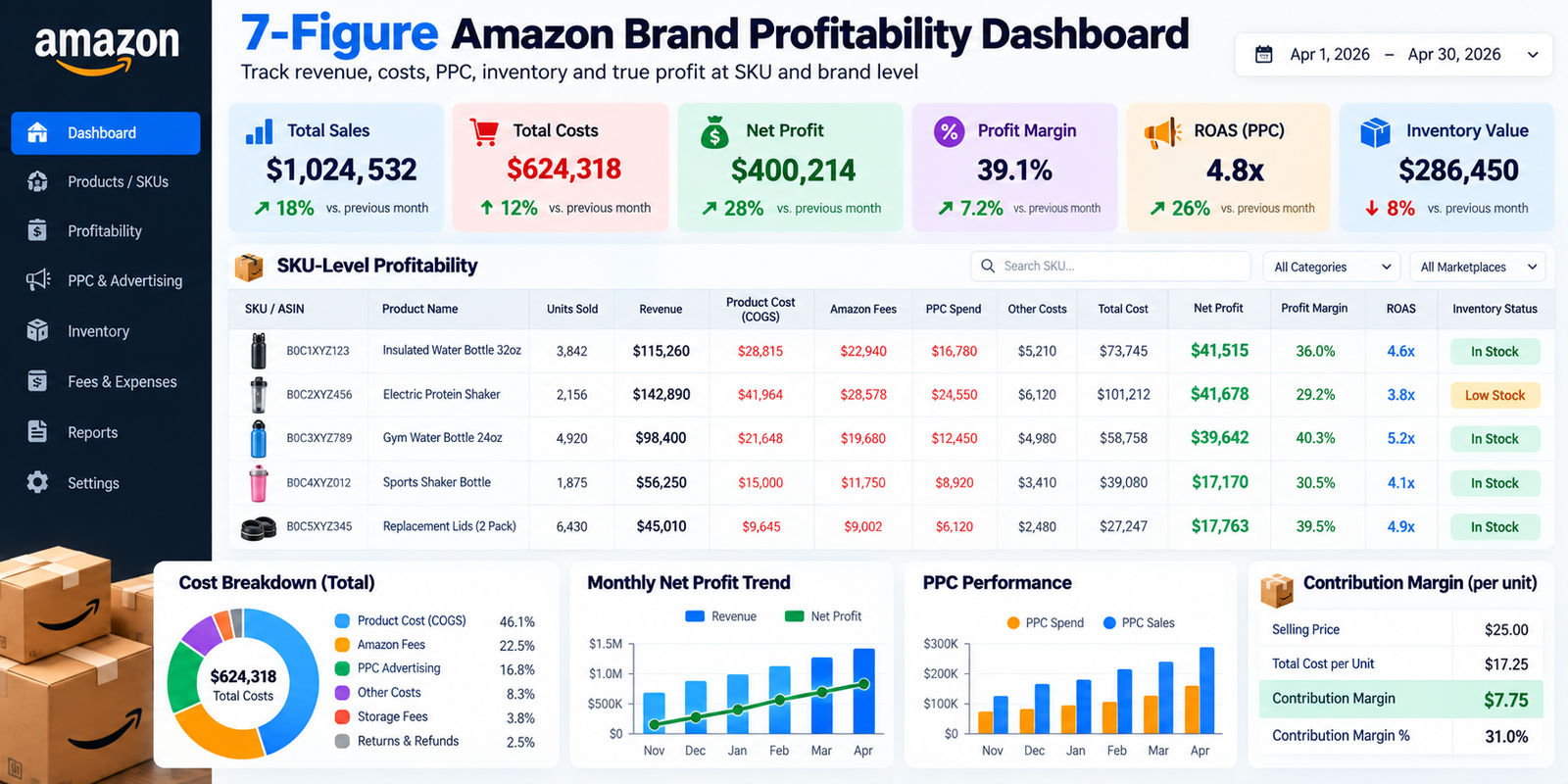
- SKU-level profitability tracking margin per individual product rather than relying on an aggregate account-wide number that can hide underperforming SKUs
- Marketplace-level profitability understanding how cost structures and margins differ if selling across multiple Amazon marketplaces
- PPC profitability by campaign and SKU not just overall ACOS, but which specific campaigns and products are actually contributing to net profit
- Contribution margin analysis identifying which products are worth continued investment and which are quietly dragging down overall performance
- Inventory costs at scale where even small per-unit storage or fulfillment inefficiencies compound significantly across large order volumes
- Forecasting connecting inventory planning to cash-flow planning, since larger inventory investments carry more financial risk if forecasts are off
- Cash flow managing the timing gaps between inventory purchases, ad spend, and Amazon payouts, which becomes more complex at higher volumes
- Product portfolio decisions deciding which products to scale, maintain, or discontinue based on actual contribution margin rather than gut feel
- Advertising efficiency across a full catalog balancing spend across many SKUs and campaigns rather than optimizing a single product in isolation
- Long-term brand growth connecting profitability data to decisions about new product launches, category expansion, or entering new marketplaces
This level of tracking is difficult to sustain manually once a catalog grows past a handful of SKUs, which is part of why many established brands bring in dedicated support whether that’s an internal analyst, better software, or an experienced Amazon agency specifically to keep this kind of granular profitability visibility intact as the business scales. Our guide on building a 7-figure Amazon brand goes deeper into the broader strategic decisions that come with this stage of growth.
How to Improve Amazon Profit Margins
Some practical, evidence-based levers worth reviewing regularly:
- Improve conversion rate a listing that converts better generates more revenue from the same traffic and ad spend, directly improving margin without increasing costs.
- Optimize listings clear titles, specific bullet points, and complete product information support both organic ranking and conversion.
- Reduce inefficient PPC spend regularly reviewing search term reports to cut spend on non-converting keywords.
- Improve keyword targeting shifting budget toward keywords and placements that are actually driving profitable sales.
- Analyze search-term performance using PPC data to understand which customer language converts, and feeding that back into organic listing content.
- Review product and landed costs periodically re-evaluating suppliers, packaging, and freight arrangements for cost efficiency.
- Improve inventory planning reducing both stockout risk and excess storage costs through better forecasting.
- Reduce unnecessary storage costs keeping inventory levels aligned with actual sales velocity rather than over-ordering.
- Improve pricing strategy testing price points against conversion rate and margin, rather than assuming lower prices always drive better overall results.
- Reduce avoidable returns addressing root causes shown in return reason data (sizing information, product quality, description clarity).
- Focus on profitable SKUs allocating more attention and ad spend toward products with strong contribution margin rather than spreading resources evenly.
- Monitor contribution margin regularly not just at the end of a quarter, but as an ongoing part of how decisions get made.
Amazon Profit Margin vs. ACOS vs. TACOS
These three metrics are often confused, but they answer different questions.
| Metric | What It Measures | Best Used For |
|---|---|---|
| Profit Margin | Net profit as a percentage of revenue, after all costs | Understanding true bottom-line performance for a product or business |
| ACOS | Ad spend as a percentage of ad-attributed sales only | Evaluating the efficiency of a specific PPC campaign |
| TACOS | Ad spend as a percentage of total revenue (organic + paid) | Understanding how dependent overall sales are on advertising |
A campaign can have an excellent ACOS while the underlying product still has poor profit margin, if the product’s costs are high relative to price. TACOS gives a broader view of advertising’s role in total revenue, but it still isn’t a profitability metric on its own it needs to be read alongside actual margin data, not as a replacement for it.
Common Amazon Profitability Mistakes
- Looking only at revenue treating top-line sales as a proxy for business health.
- Ignoring PPC costs when evaluating a product’s profitability reviewing product margin without factoring in what it actually costs to generate the sales.
- Ignoring returns assuming a low return rate applies uniformly without checking actual return data by product.
- Using manufacturing cost instead of landed cost overstating margin by leaving out freight, duties, and prep.
- Ignoring storage costs treating storage as a minor, forgettable line item rather than tracking it by SKU.
- Measuring ACOS without profitability context optimizing a metric that looks good in isolation while the underlying product margin stays thin or negative.
- Focusing on one SKU instead of the whole portfolio missing how underperforming products drag down overall account profitability.
- Not tracking marketplace-specific costs assuming cost structures are identical across different Amazon marketplaces when they often aren’t.
How an Amazon Agency Can Help Improve Profitability
An experienced Amazon agency’s value in this area comes from ongoing, structured attention to the details covered throughout this guide not a one-time fix. That typically includes:
- PPC optimization regularly reviewing campaigns against actual profitability, not just ACOS in isolation
- Amazon SEO improving organic rank to reduce long-term dependence on paid traffic
- Listing optimization improving conversion rate so existing traffic and ad spend generate more revenue
- Account management keeping catalog health and account status stable, which protects consistent sales performance
- Inventory planning support helping avoid the stockouts and overstock situations that directly hurt margin
- Reporting translating scattered fee and performance data into a clear, regular picture of actual profitability
- SKU-level analysis identifying which products are genuinely worth further investment
- Strategic growth planning connecting profitability data to decisions about new products, pricing, or expansion
No legitimate agency can guarantee a specific profit increase without first understanding your category, margins, current costs, and competitive position in detail be cautious of any claim that suggests otherwise. What a good agency partner can offer is disciplined, ongoing attention to the cost and performance details that are easy to lose track of while running the rest of a business. If you’re evaluating outside support, our guide on how to choose an Amazon agency covers what to look for, and our Amazon advertising and listing optimization services are both built around this same profitability-first approach.
Amazon Profit Margin Checklist
Run through this monthly for each key product or SKU:
- Revenue
- COGS (landed cost, not just manufacturing price)
- Landed cost breakdown (freight, duties, prep included)
- Amazon referral fees
- FBA fulfillment fees
- PPC spend (allocated per product where possible)
- Storage fees
- Returns/refunds
- Discounts and promotions
- Other operating costs
- Contribution margin
- Net profit
- Profit margin (%)
Frequently Asked Questions
What is a good Amazon profit margin?
There’s no single percentage that applies universally. The right profit margin depends on factors such as product category, price point, COGS, advertising intensity, competition, return rate, FBA costs, marketplace, and your business goals.
How do you calculate Amazon profit margin?
Subtract COGS and all operating expenses, including Amazon fees, FBA fees, PPC, storage, returns, and other costs, from revenue to calculate net profit. Then divide net profit by revenue and multiply by 100.
Does Amazon profit margin include PPC?
Yes. PPC is a real operating expense and should be included when calculating net profit. Excluding advertising costs can significantly overstate your actual profitability.
What is the difference between Amazon ACOS and profit margin?
ACOS measures advertising spend as a percentage of ad-attributed sales, while profit margin measures net profit as a percentage of total revenue after all relevant costs. A campaign can have a low ACOS while the product still has a weak profit margin.
What is Amazon FBA profit margin?
Amazon FBA profit margin is the profit margin calculated for products fulfilled through FBA. It should account for product cost, referral fees, FBA fulfillment fees, storage, PPC, returns, and other applicable costs.
How can I improve my Amazon profit margin?
You can improve profit margin by improving conversion rate, reducing inefficient PPC spend, reviewing landed product costs, improving inventory planning, reducing unnecessary storage costs, optimizing pricing, reducing avoidable returns, and monitoring contribution margin by SKU.
Should Amazon storage fees be included in profit calculations?
Yes. Amazon storage fees and applicable aged-inventory charges are real business costs and should be included when calculating accurate product or SKU-level profitability.
How do 7-figure Amazon brands track profitability?
Growing Amazon brands typically benefit from SKU-level and marketplace-level profitability tracking, contribution margin analysis, PPC efficiency analysis, inventory forecasting, cash-flow planning, and portfolio-level performance reporting.
What is the difference between revenue and profit on Amazon?
Revenue is the total amount generated from sales before costs are deducted. Profit is what remains after subtracting COGS and operating expenses. Revenue shows how much you sold, while profit shows what you actually kept after costs.
Can an Amazon agency help improve profitability?
An Amazon agency can provide ongoing support through PPC optimization, SEO, listing optimization, inventory planning, reporting, and SKU-level analysis. However, profitability depends on the specific product, costs, category, competition, and business strategy, so no legitimate agency can guarantee a specific profit outcome.
1 Comment on "Amazon Profit Margin Calculator | How to Calculate Your True Amazon Profit in 2026"
[…] at all, once every cost is included. For a full breakdown of how to calculate this properly, our Amazon profit margin calculator guide walks through the complete formula with worked […]